Enter password to view case study

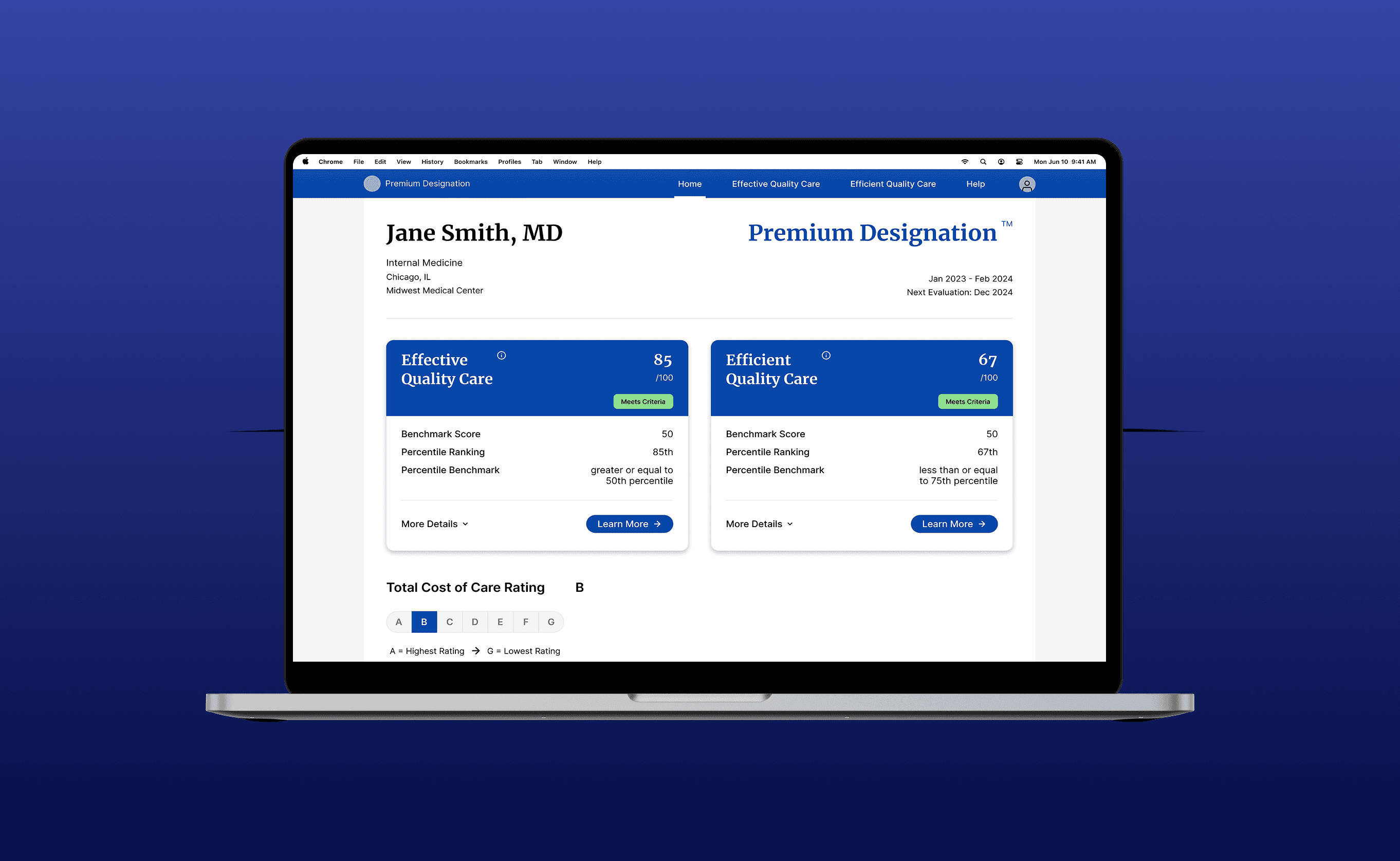
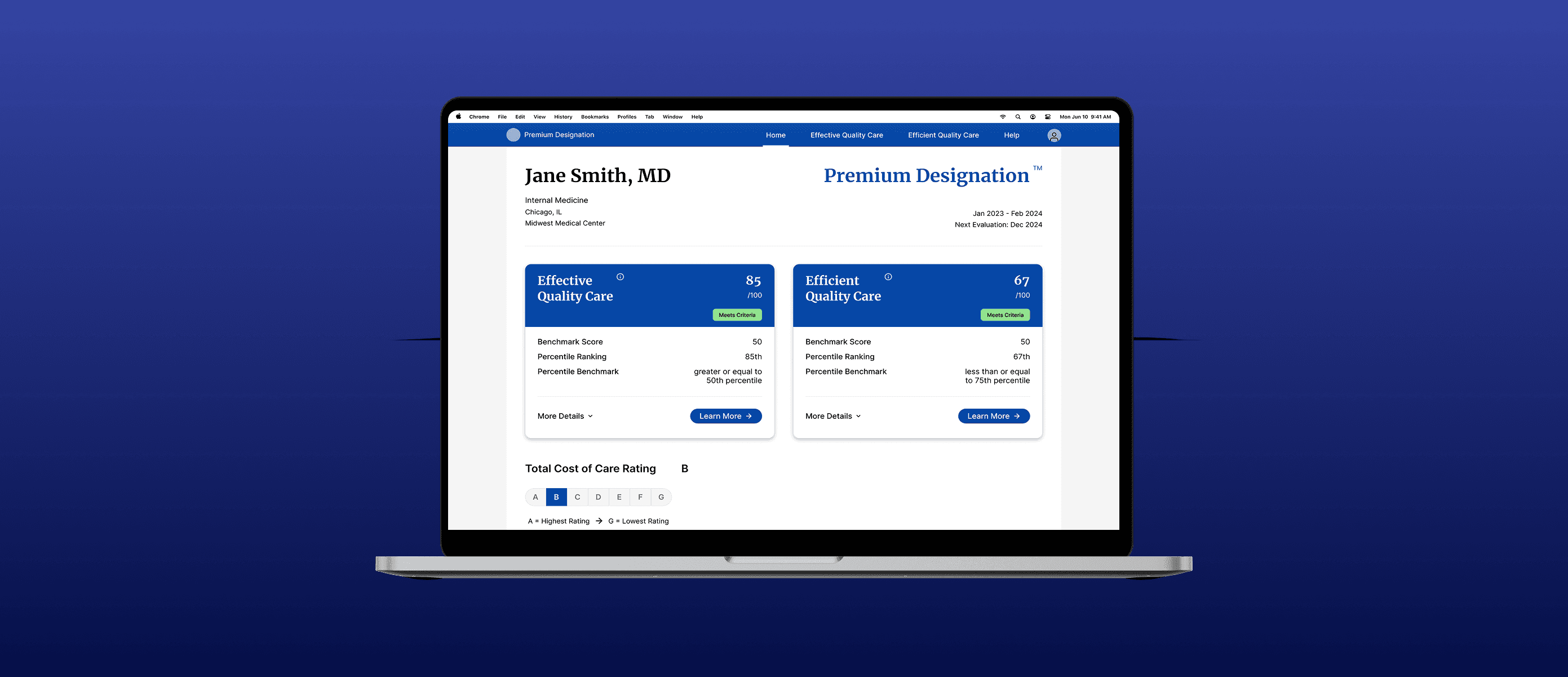

Simplifying Complex Data for 350,000+ Physicians
Scope
Physician performance evaluation platform
Role
Sole UI/UX Designer
Duration
3 months
Team
Product Owner, Marketing Director, 3 Engineers
For 16 years, UnitedHealth Group's approach to physician confusion on their performance evaluation platform was to add more information. The platform had grown to include statistical formulas, percentile breakdowns, case-mix adjustments. It was complexity layered on complexity.
The platform evaluates physicians on two core metrics: one measuring clinical quality (do you follow evidence-based guidelines?) and one measuring cost efficiency (how do your costs compare to peers?). Based on these scores, physicians either receive a designation or they don't. This designation affects their visibility to patients and referral patterns.
When I came in, I analyzed support call logs and found the real problem: physicians weren't asking 'how is this calculated?' They were asking 'did I pass?' The solution wasn't more information. It was better presentation of the right information.
This case study describes my process and contributions while respecting confidentiality. Specific system names and internal details have been generalized.
The Challenge
This was a 16 year old product coming into its 17th iteration. Since the beginning, the team had approached physician confusion the same way: if users don't understand their results, give them more information to help them understand. The interface had thus grown to include statistical formulas, percentile breakdowns, case-mix adjustment explanations, confidence intervals, and compliance rate calculations.
The assumption was reasonable. Physicians are educated professionals, so providing the methodology should help them interpret their scores. However, it wasn't working.
The Problem
What Physicians Needed
What is my score?
Did I pass?
If not, how do I improve?
What They Were Getting
The existing interface showed physicians the entire statistical machinery behind their scores:
Statistical test results
Percentile calculations
Case-mix adjustment formula
Treatment set compositions
The problem wasn't that the information existed. Stakeholders had legitimate reasons for wanting it available. The problem was that it was presented with equal weight to the answers users actually needed, forcing physicians to wade through statistical jargon to find their designation status.
Beyond the data overload, the site architecture itself created confusion. A heuristic analysis revealed multiple entry points leading to the same content, navigation dead ends, and critical information nested two or three levels deep. There was no clear hierarchy guiding users to what mattered most.
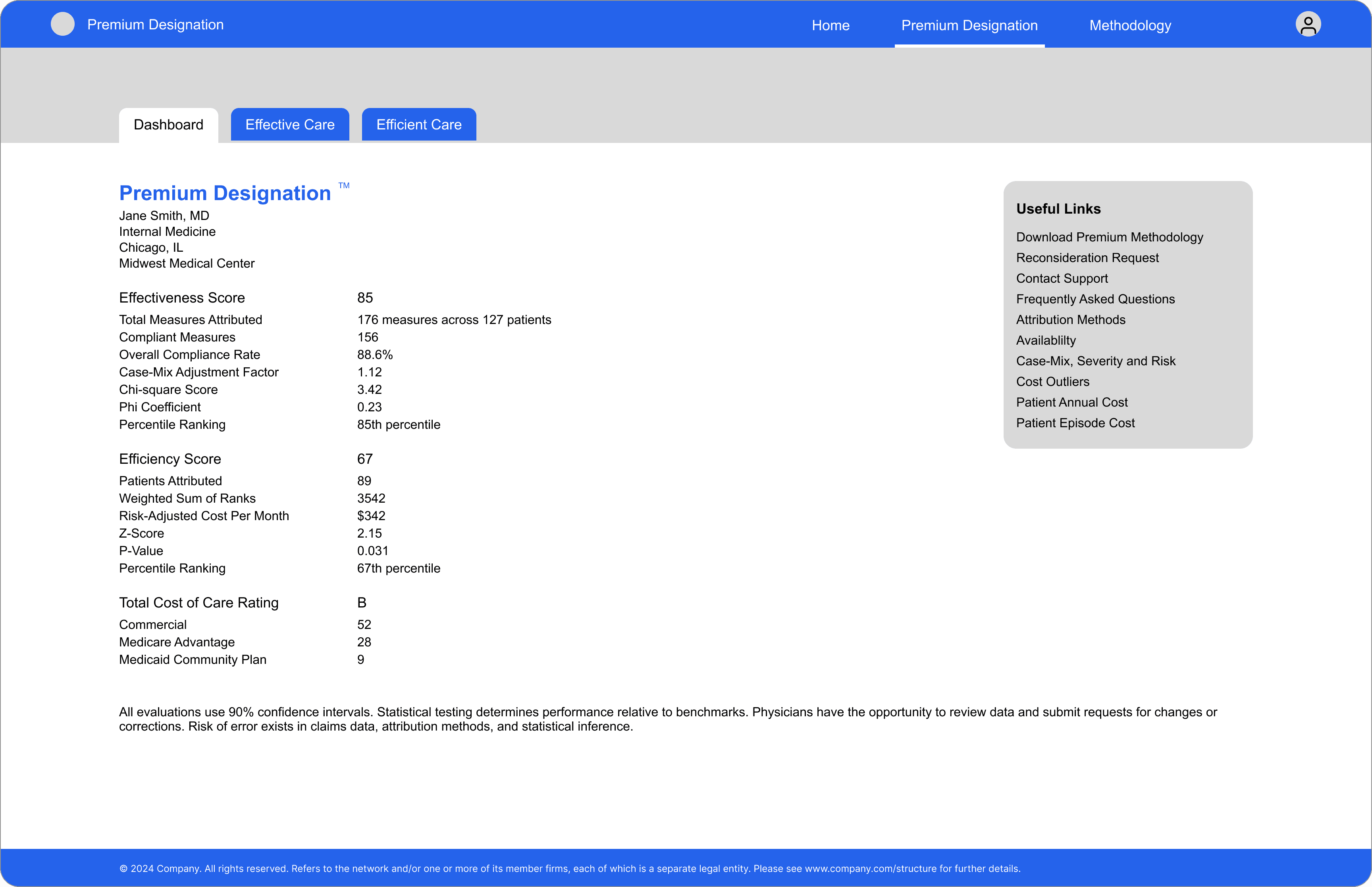
Performance evaluation dashboard - before redesign
The result was confused physicians calling support to ask basic questions that the interface should have answered on its own.
Marketing heard the same feedback repeatedly:
"I don't understand my score."
"Why didn't I qualify?"
"What do I need to do?"
My Approach
This team had never had a designer before. There were no established processes for design reviews, documentation, or handoffs. I needed to build that infrastructure while solving the core problem.
How I Worked
Established Collaboration
Weekly design reviews with engineering, presenting work-in-progress before showing stakeholders. Engineers understood my rationale; I understood their constraints. When we presented together, we were aligned.
Gathered Evidence
I had no direct access to physicians, so I analyzed support call logs. What questions did users ask? Where did they get stuck? What language did they use? These became qualitative data points that shaped the solution.
Mapped the Problem
Stakeholder interviews with product, marketing, engineering, and support. Heuristic analysis of the existing interface. The site map revealed structural issues: redundant paths, buried content, no clear hierarchy.
Navigated Stakeholder Constraints
Stakeholders worried that removing statistical data would reduce credibility. Rather than insist on removal, I proposed progressive disclosure: show outcomes by default, make statistical detail available on demand. This shifted the discussion from "what to remove" to "how to reveal," leading to consensus.
Call log analysis revealed: physicians weren't asking methodology questions. They weren't calling to understand statistical formulas. They were calling to find out if they passed and what to do next.
The confusion wasn't caused by insufficient information. It was caused by too much information obscuring the answers they needed.
The Shift
The Existing Approach
"If physicians don't understand their results, give them more information to help them understand."
My Proposal
Stakeholders insisted that all statistical data remain visible. They believed removing it would undermine credibility with physician users.
Rather than fight to remove information, I proposed strategic information reveal: answer the user's primary question by default (Did I pass? What's my score?), then provide statistical detail through progressive disclosure for users who want it.
In addition, I identified that the two score category names were too similar. Users couldn't remember which was which and didn't understand the difference between the two. Renaming wasn't possible due to established program branding and would have required a massive documentation overhaul upstream.
The workaround:
Explanatory text on each detail page and tooltips on the dashboard clarifying what each score measured. The naming stayed, but the confusion was addressed through UI.
The Solution
I structured the entire experience around two questions physicians were actually asking:
What do I need to know?
What can I do about it?
The Information Hierarchy
The existing architecture scattered critical information across multiple entry points. Physicians had to navigate three different views just to understand if they qualified.
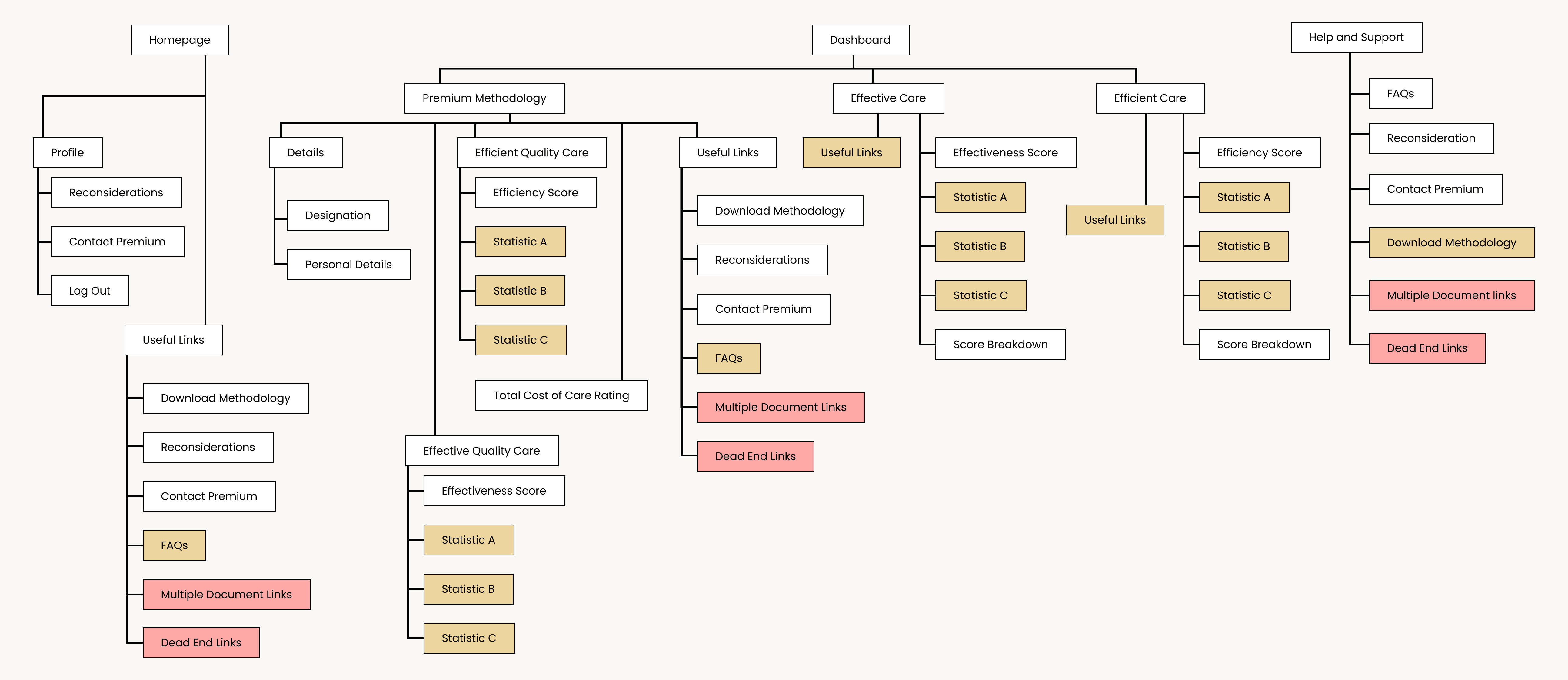
Information Architecture before redesign with multiple entry points and critical information buried under a click
I restructured it into a clear hierarchy:
Level 1: Dashboard
Immediate answer: did you qualify? Your two scores with visible thresholds. Clear next actions.
Level 2: Score Details
For physicians who want context: category breakdown, benchmark comparisons, what's affecting the score.
Level 3: Methodology
For the few who want to understand the math: available but not required, accessible from every page.
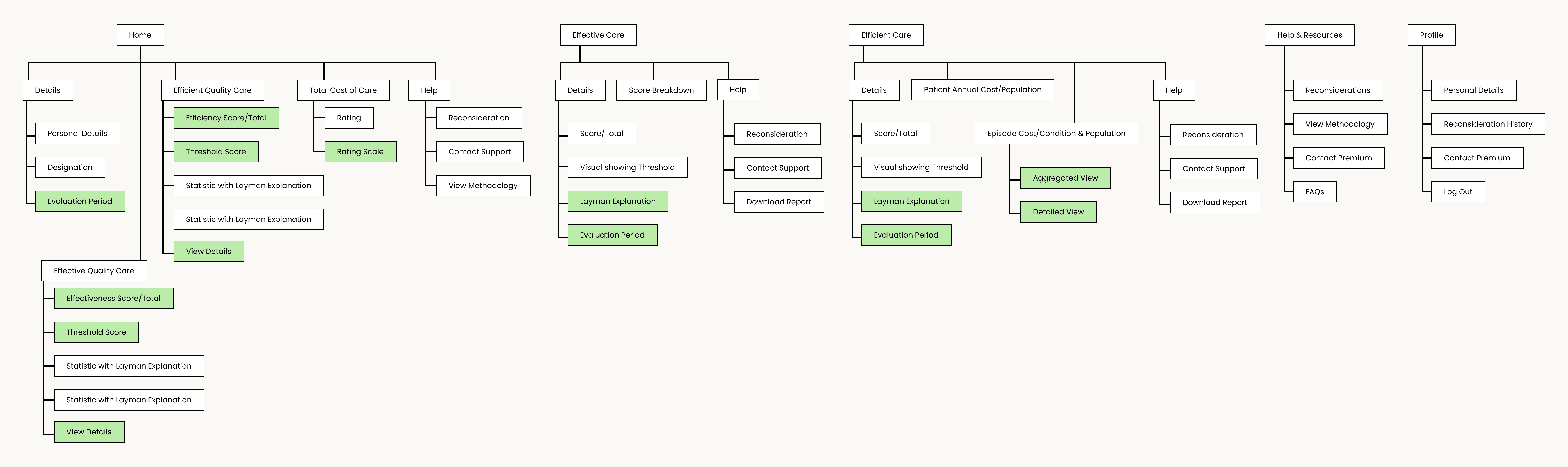
Information Architecture post-redesign with clear hierarchy, information, and action paths
This wasn't about hiding information. It was about answering questions in the order physicians were asking them.
Design Execution
I transitioned the platform from developer-built components to UHG's design system, applying their established component library, typography scale, and grid system. This ensured visual consistency with other UHG applications while significantly improving the interface's polish and accessibility.
For elements unique to this evaluation platform, particularly the score cards on the dashboard, I designed custom components that extended UHG's design language while meeting the specific needs of physician users.
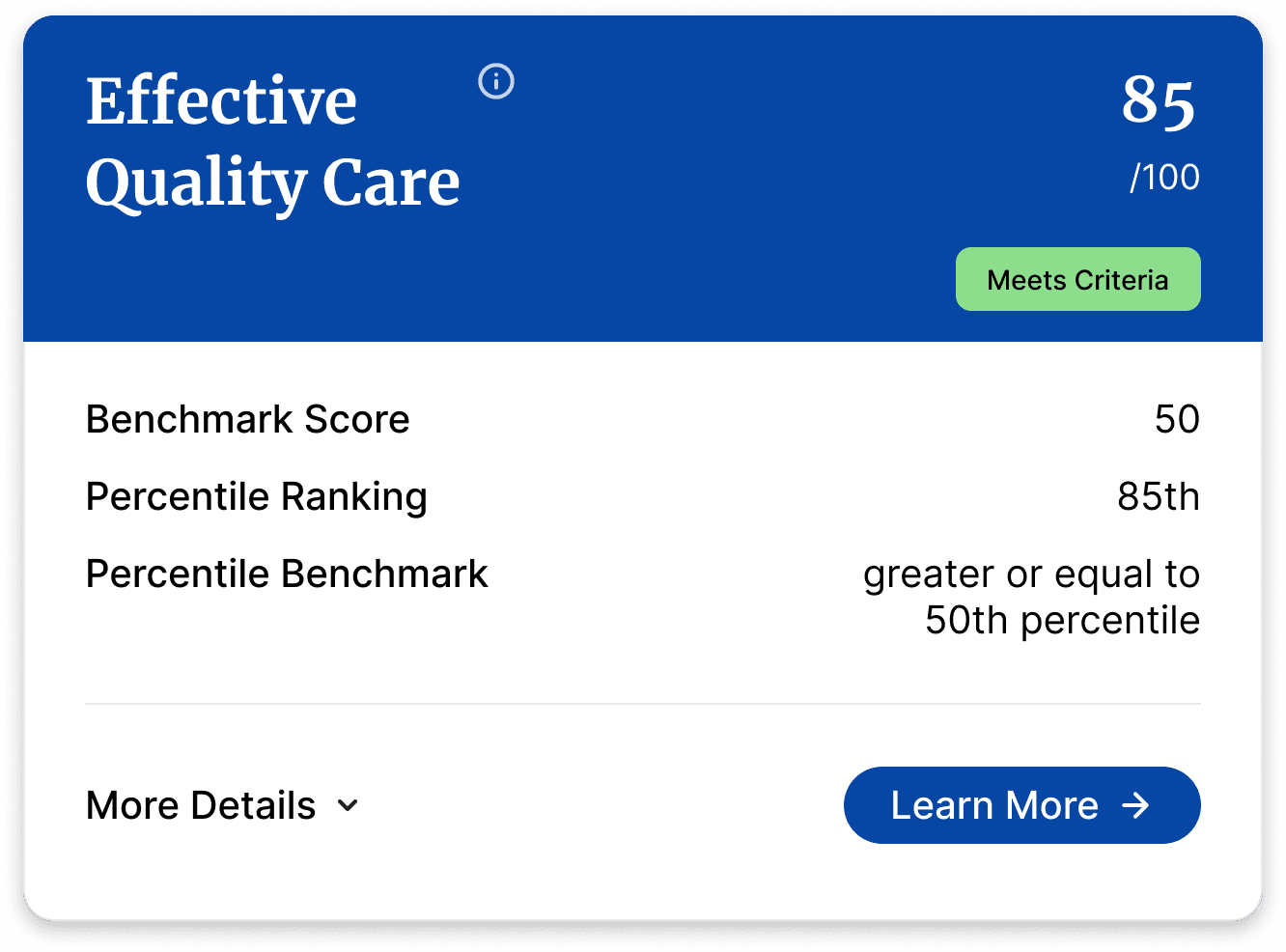
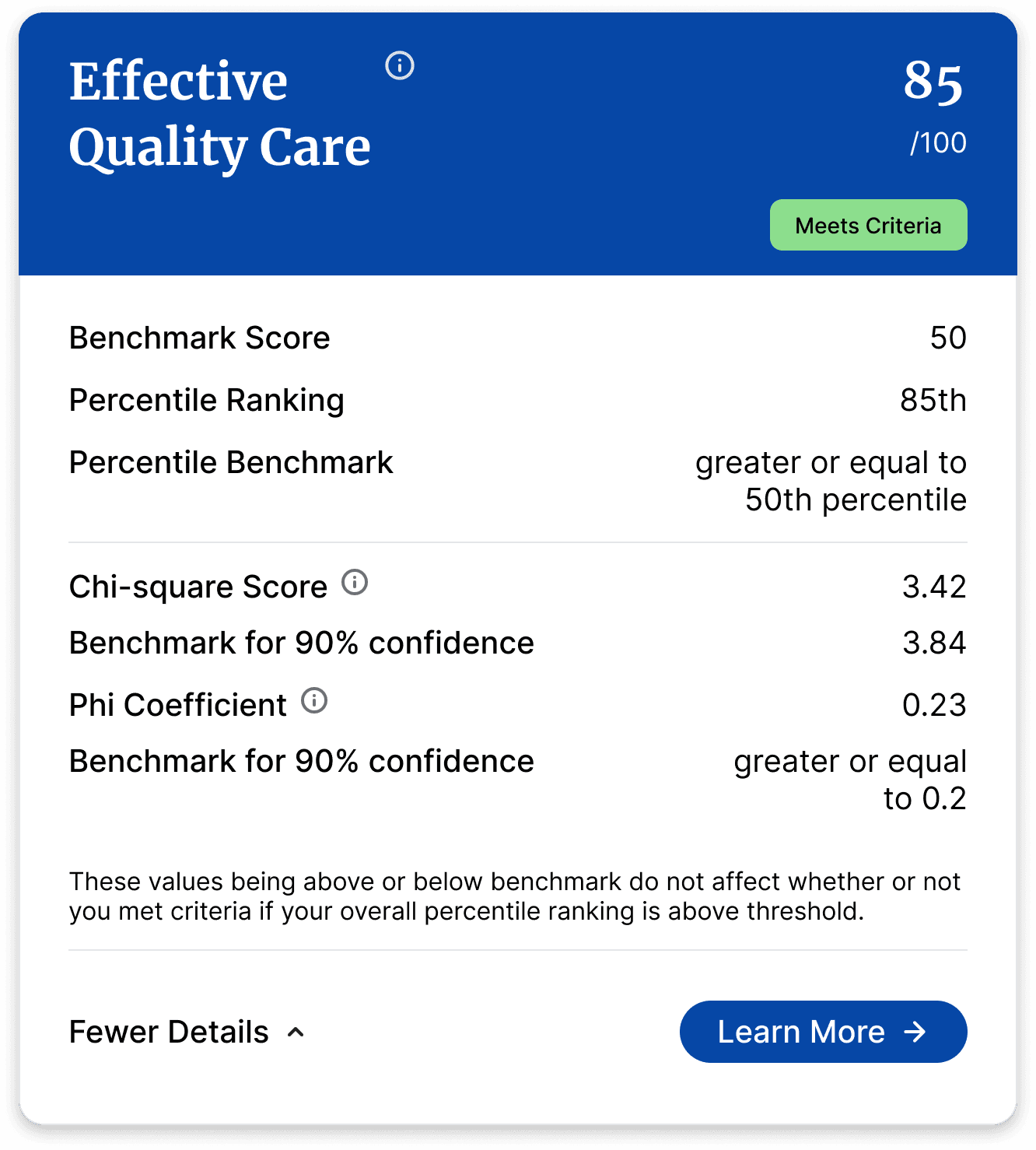
Stakeholders required that statistical calculations remain visible despite user research showing physicians found them confusing. I used progressive disclosure through accordion-based score cards.
Default View (collapsed):
In the default state, the cards show:
score and percentile ranking
pass/fail status through a clear visual indicator (Meets/Does Not Meet Criteria badge)
benchmarks for score and percentile
Expanded View:
Statistical information was retained, but they were made understandable by:
adding specific benchmarks
including tooltips with explanations regarding how to recognize a positive score
a note indicating that the percentile ranking alone determines pass/fail status
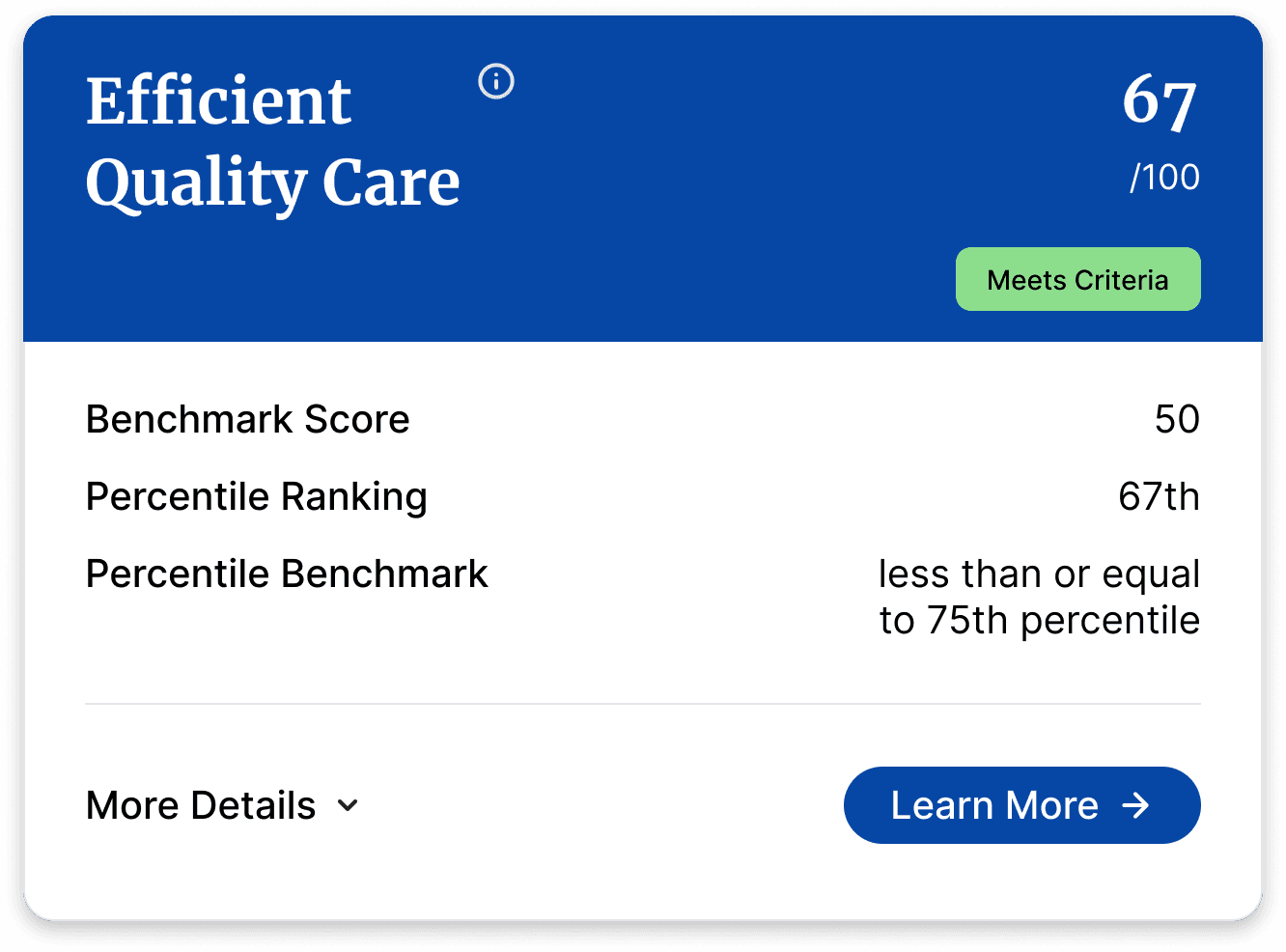
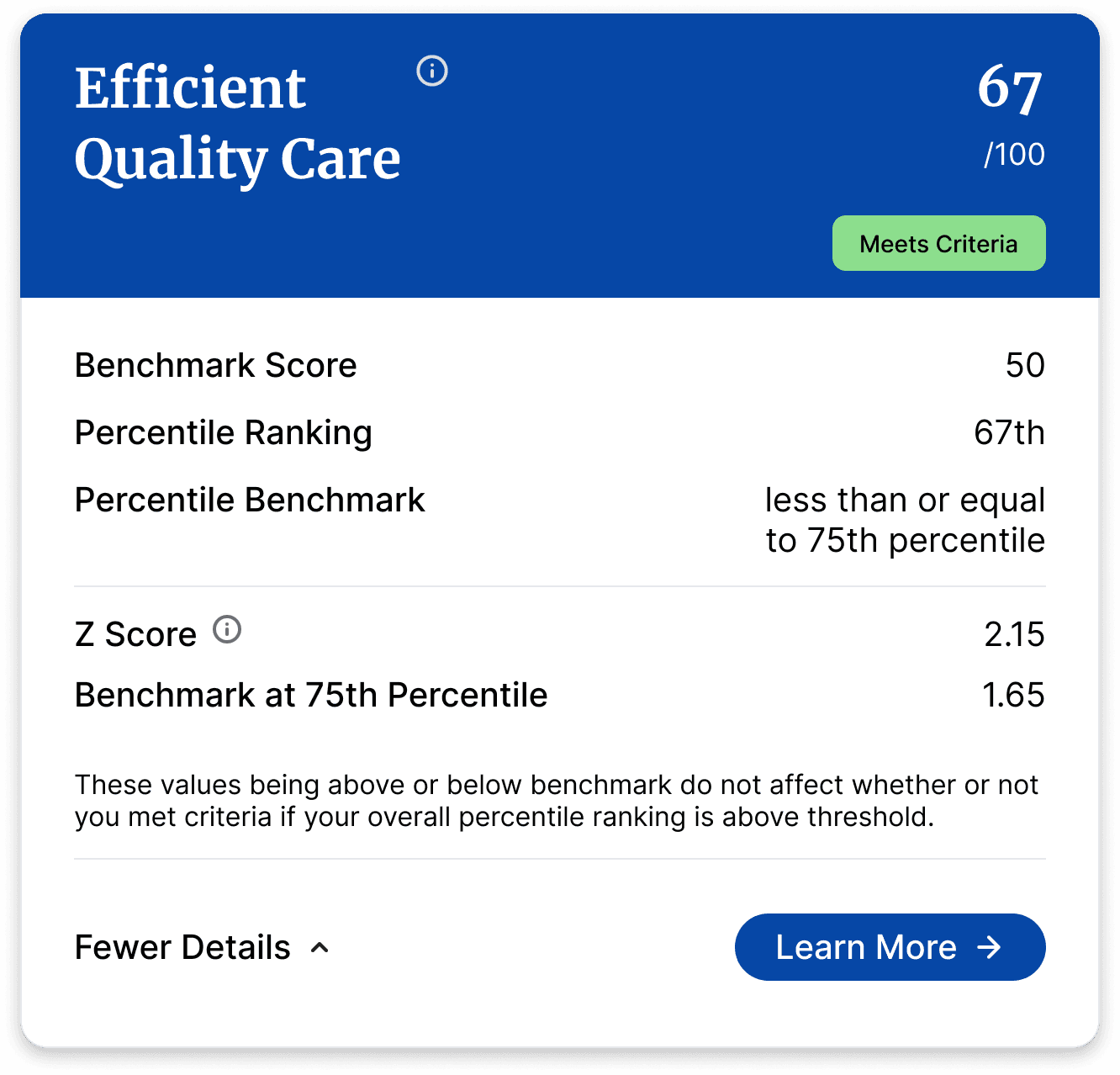
This approach satisfied stakeholder requirements while solving the user problem. Users who don't need statistical detail never have to see it. Users who want it can access it with one click.
Level 01 - The Dashboard
This is the first thing physicians see. Designation status is the hero element: did they qualify or not? Below that, their two scores with visible thresholds and tooltips explaining what each measures. Clear actions: View Details, Request Reconsideration, Contact Support, View Methodology.
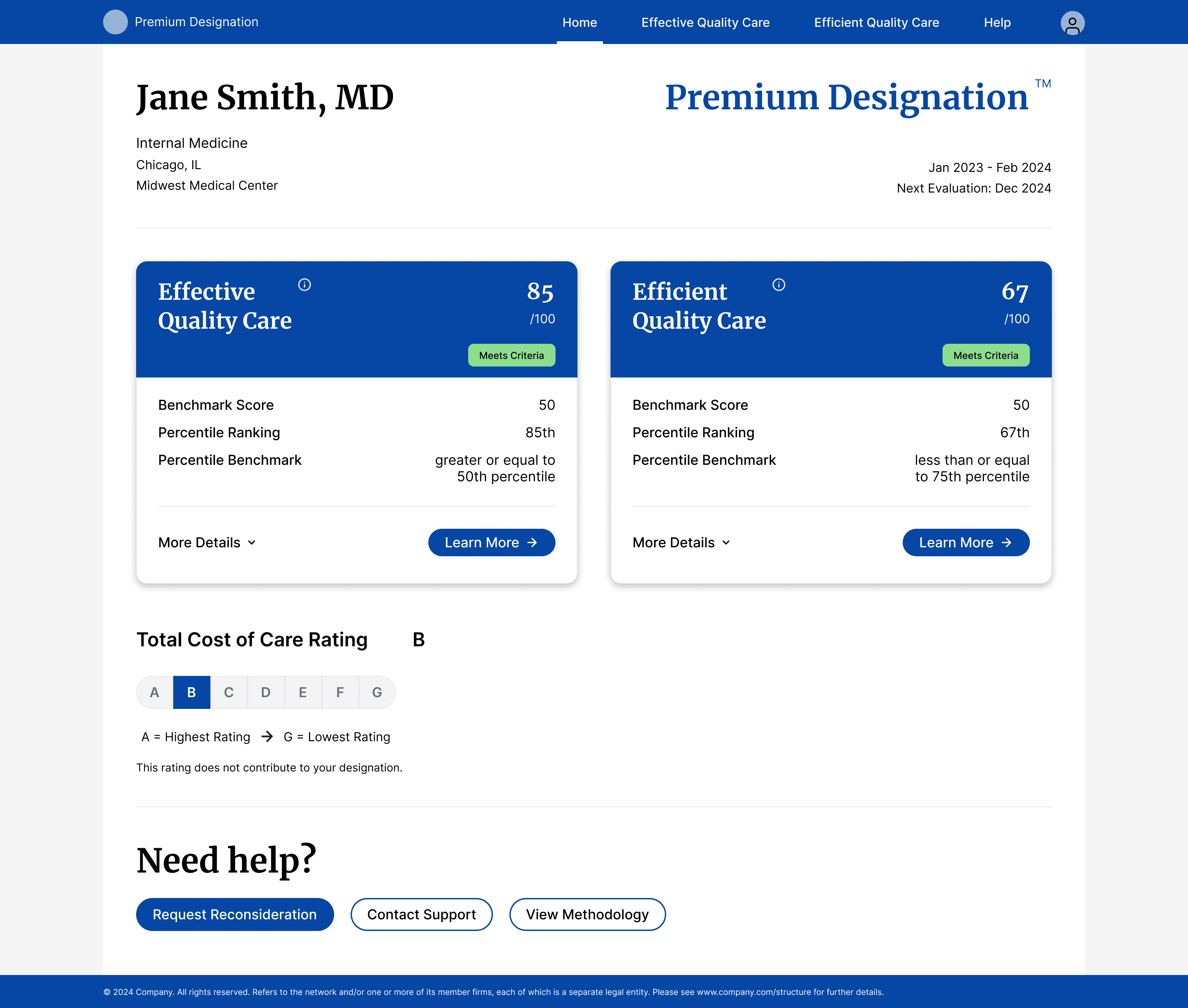
Landing page Dashboard with answers to immediate questions in its default view
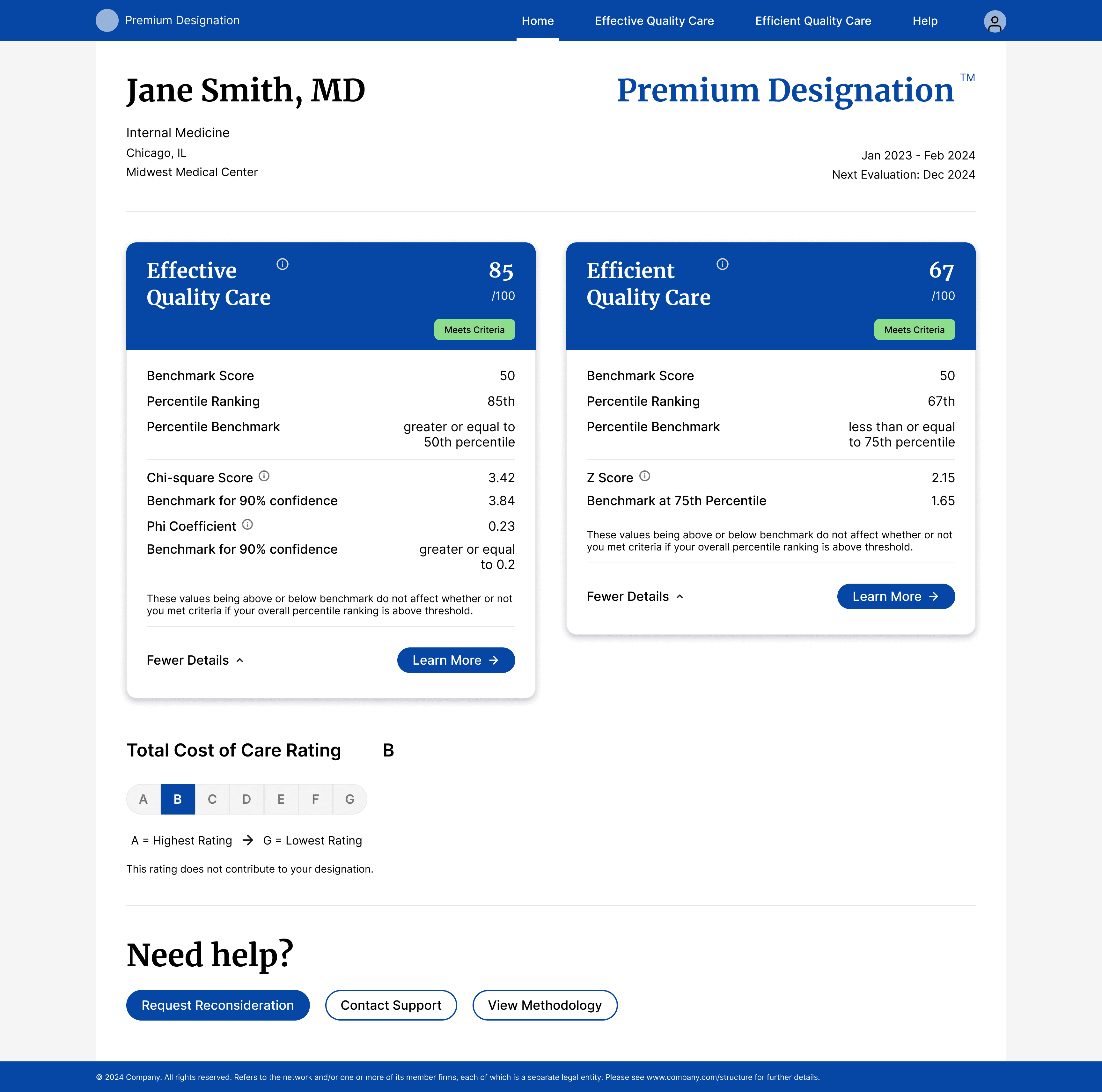
Dashboard with additional statistical scores in its expanded view with benchmarks and tooltip explanations
Level 02 - Score Details
This is a more detailed breakdown for physicians who want to understand their scores better. It is detailed by category with comparison to benchmarks and what's affecting their score. Explanatory text at the top clarifies what the score measures in plain language.
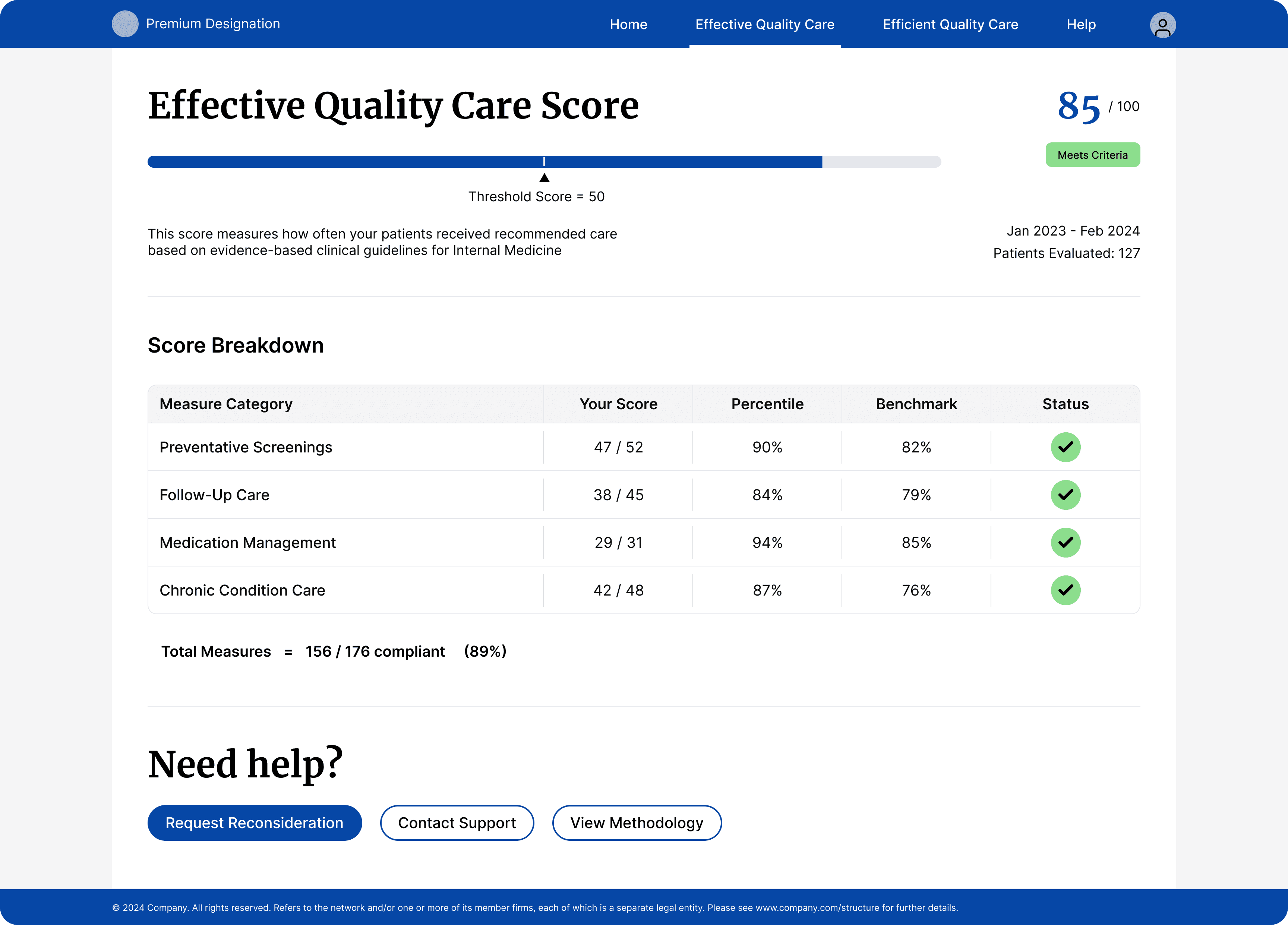
Effective Quality Care score details page
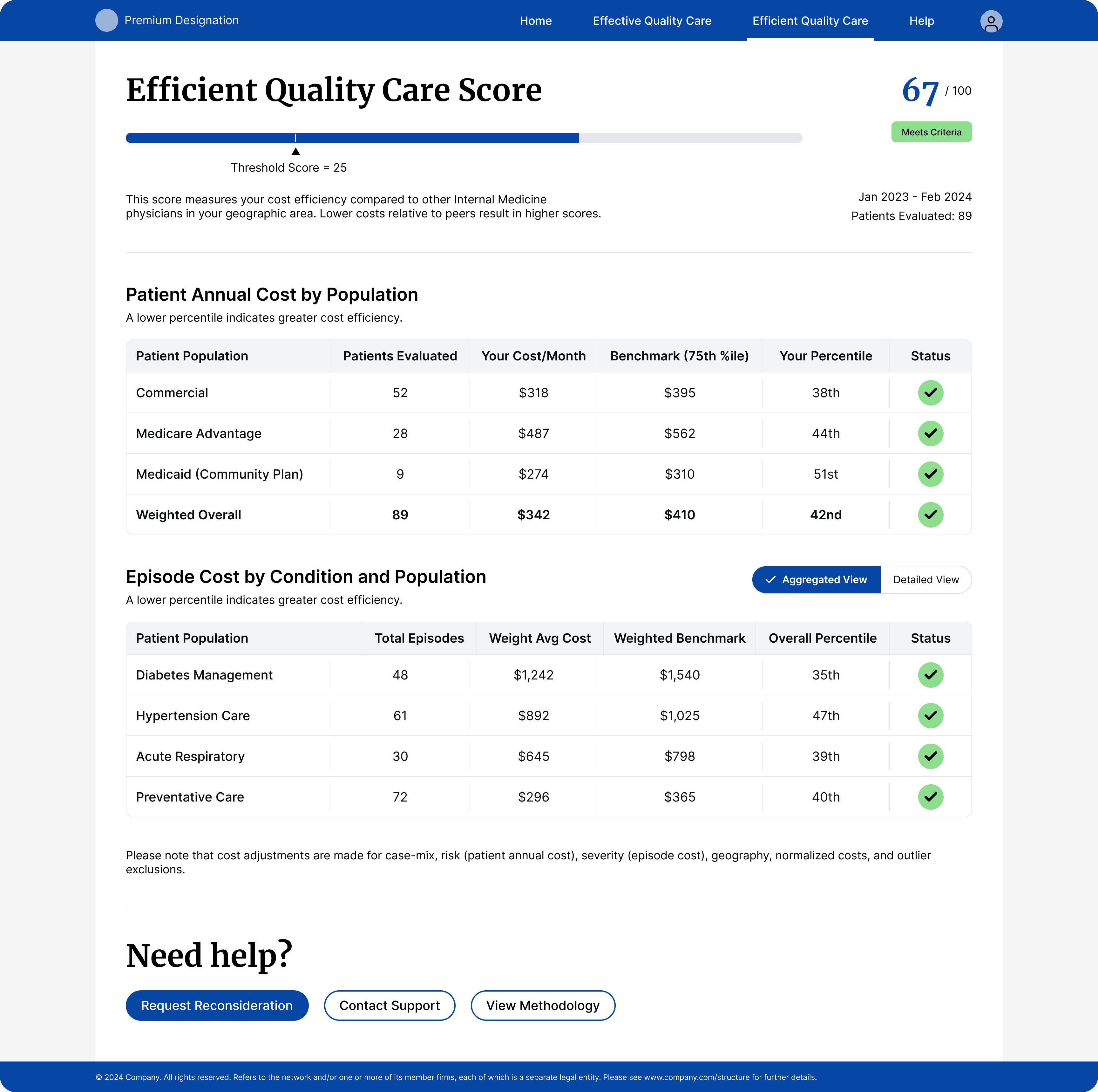
Efficient Quality Care score details page
Level 03 - Methodology
This is for the physicians who still want help understanding their scores. Available, but in a different tab and accessible from every page. Users can navigate to it if they want to go over the methodology and contact the Premium team.
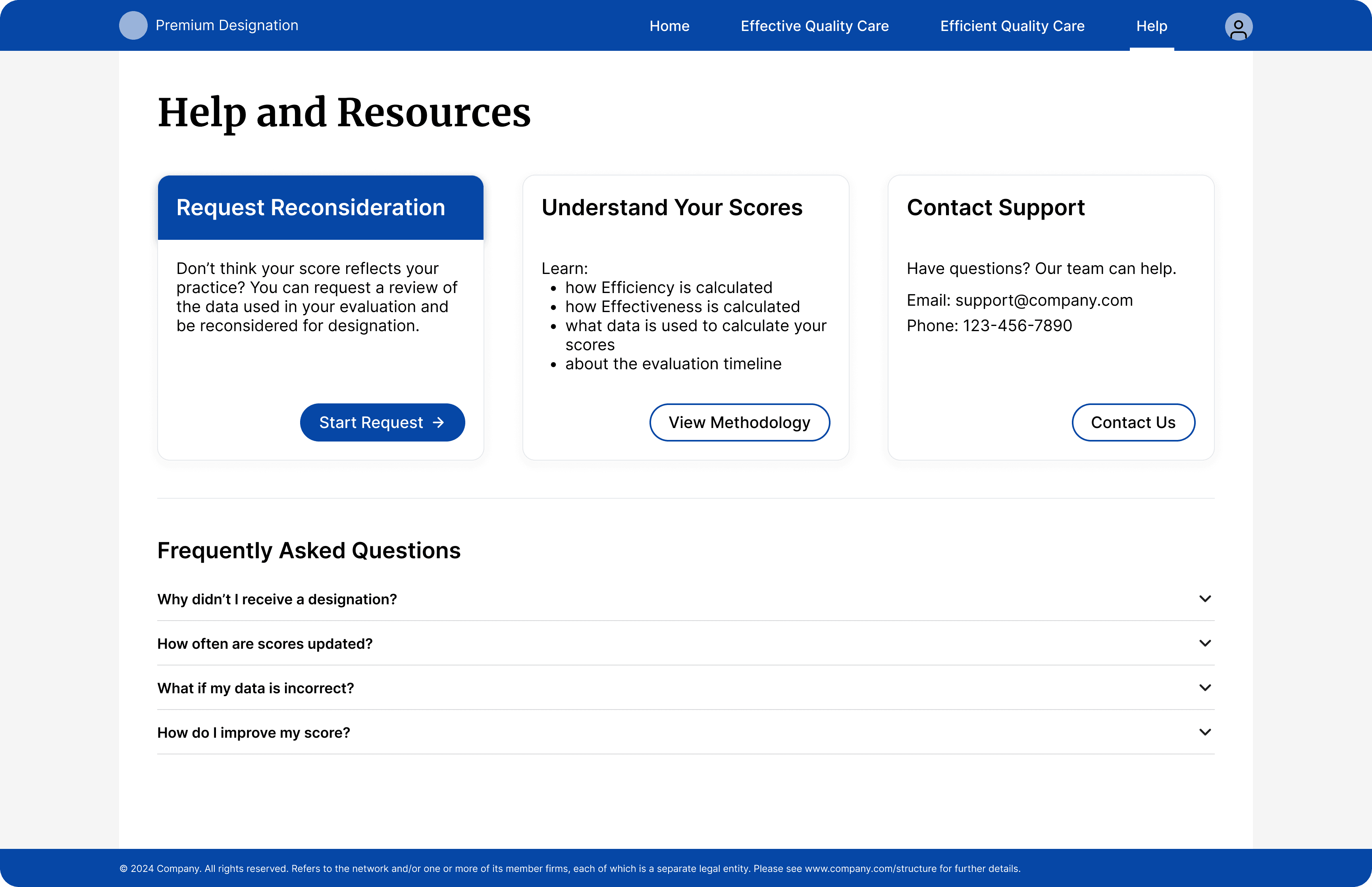
Methodology and reconsideration requests available on request

Surya jumped right in and delivered beautiful designs to an overly complex concept. Outside of that, she's a super awesome human and I could only be so lucky to work with her again!
Brooke Klaers
Director of Marketing Engagement, UHG
Video Prototype
Reflection
01
Evidence Enables Change
Proposing a different approach to a 16-year-old problem required evidence. Despite not having access to end users, the qualitative data from call logs made the case in a way that design opinion alone couldn't.
02
Strategic Compromise Over Rigid Principles
The progressive disclosure solution for the score cards required letting go of the perfect solution (complete removal) in favor of the strategic solution (smart presentation). The best design is the one that balances user needs with business constraints in a way both can accept.
03
Work Around What You Can't Change
Not every constraint is solvable head-on. Sometimes you design around them. The naming stayed the same, but the confusion was addressed through supporting UI elements.
04
Build Infrastructure, Not Just Interfaces
Being the first designer on a team means building infrastructure, not just shipping screens. The collaboration patterns I established created value beyond this single project.
This project reinforced that simplification is harder than addition. Showing less, and making that case to stakeholders, required more rigorous thinking than showing more ever would have.
Let's work together
The assumption was reasonable — physicians are educated professionals, so providing the methodology should help them interpret their scores.