
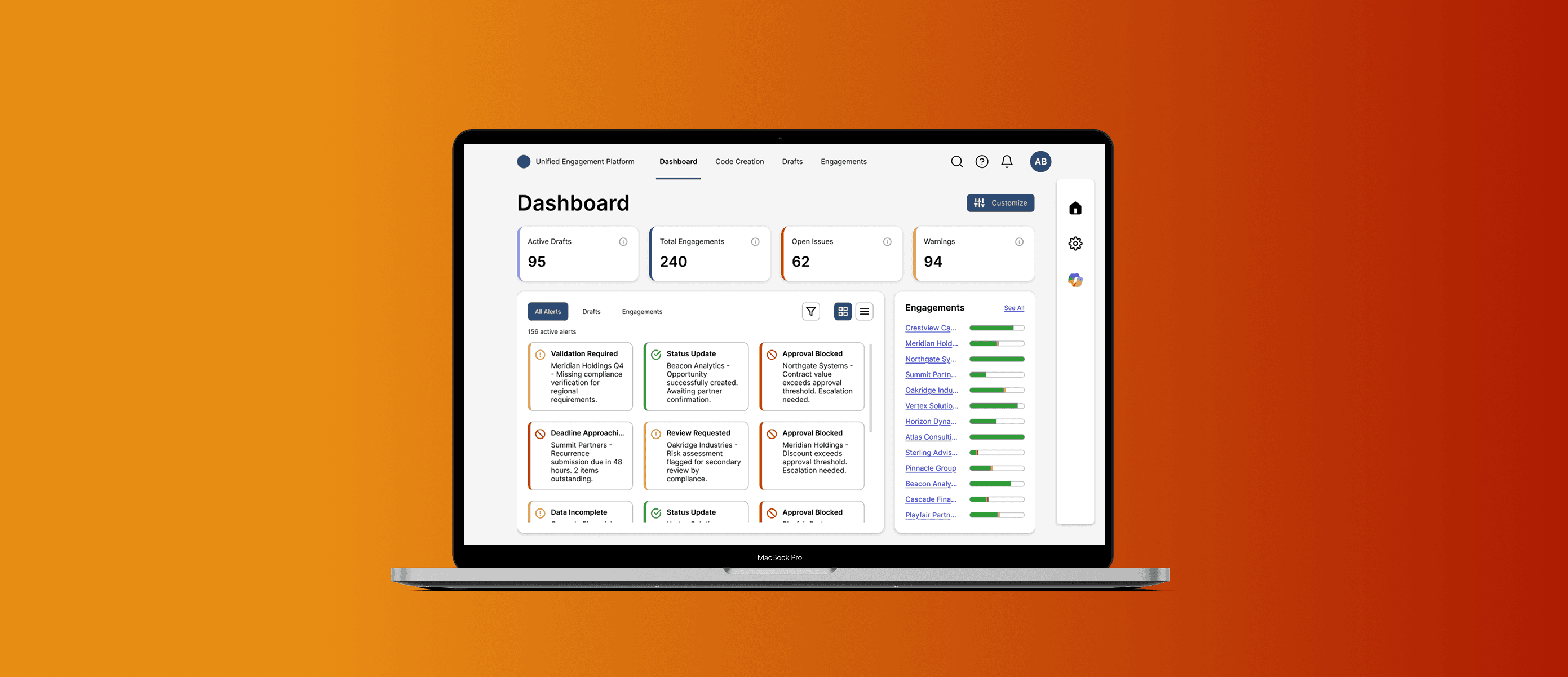
Enterprise platform design & process innovation
Scope
Global contract management platform
Role
Lead UI/UX Designer
Duration
18 months
Team
UX Manager, Project Manager, Business Analysts, Engineers, Scrum Masters
I worked on PwC's global contract management ecosystem for 18 months, designing across four projects:
a unified engagement platform merging two existing systems,
an AI-native onboarding interface,
an internal API marketplace, and
a validation framework that stretched across the whole system.
I was a contractor through Infosys, the only designer on most projects, working remotely from the Bay Area, while Development was based out of India and Business was stretched between Miami, Poland, and Singapore.
The most lasting impact I had at PwC was a new design-dev workflow I built on the API marketplace project. It cut delivery time 10% and improved consistency 25%. After the pilot, it was adopted across PwC's Lean UX Center of Excellence and applied to other projects, including ones I later worked on.
10%
faster delivery
25%
improved consistency
12
territories researched
Company-wide
process adoption
This case study describes my process and contributions while respecting confidentiality. Specific system names and internal details have been generalized.
Process Innovation
I was on an internal API marketplace project a few months into my time at PwC as their only designer. Figma was new at PwC, and most developers were used to receiving static PNGs made in Adobe XD attached to Azure DevOps tickets. They would translate the static UI into code, being unaccustomed to collaborative design processes or prototypes. Issues would inevitably surface mid-build and QA would send tickets back upstream. Rework was constant. We worked in siloes with Business dominating standups, Design with very little voice, and Dev rarely spoke at all.
The Old Process
Business defines requirements in a meeting, documents in ADO.
Design creates static mockups in Adobe XD.
Mockups get approved in meetings, developers often absent or silent.
Approved designs delivered as PNG screenshots attached to ADO tickets.
No documentation, no interaction specs, no context.
Developers build in isolation, discover issues mid-development.
Back-and-forth revisions, QA finds more issues, endless cycles.
The teams were siloed and the handoffs were broken. I didn't have the authority to change how the org worked, but I had an active project I could pilot a new approach on. So I built one.
My Solution: A 7-Stage Workflow
Briefing
Business, design, and dev leaders align on complete requirements before sprints begin. Everything documented in Azure DevOps. Scope changes move to new sprints, forcing clarity upfront.

Sandbox
Designers explore concepts in Figma, iterating through low-fidelity ideas before committing to high-fidelity solutions.
Feedback
Weekly cadences where design presents to business AND developers together. Meetings are recorded for absent team members. Wireframes are linked to ADO user stories, with a 2-3 day async feedback window where all stakeholders comment directly in Figma. Major decisions are documented in ADO.
Ready for Dev
Final wireframes with complete annotations and interactive prototypes. Sectioned in Figma and linked in ADO, these become the source of truth for Development and QA. Once finalized, they are never changed and remain as a source of documentation. Any non-urgent updates that arise are moved to the next sprint cycle.
Development
Dev team builds from wireframes, prototypes, and documentation, with clear understanding of intended behavior and interactions.
QA
Quality assurance references Ready for Dev wireframes as source of truth for validation.
Amendments
If QA identifies critical issues requiring immediate fixes within the same sprint, a new user story is created. Designer copies Ready for Dev wireframes to Amendments section, makes changes, documents thoroughly, shares updated link.

Process Swimlane Diagram
Documentation Example: Ready for Dev Handoff
Each feature was sectioned out and documented in Figma with annotations describing complete interaction specifications, linked to the corresponding Azure DevOps user stories, and provided with interactive prototypes. The "Save Filters" feature documentation shown below is a good example. Developers received everything they needed to build without requiring additional design clarification.
Once submitted, these wireframes were frozen. They stayed unchanged in the documentation, and any further updates were made on amended copies.

Complete documentation includes: user flow, interaction specifications, validation rules, error states, and links to ADO stories and prototypes.
This eliminated ambiguity and reduced back-and-forth between design and development.
Getting Buy-In
I pitched the workflow to product leadership first, framing it around quality improvement and risk reduction. Then I ran workshops with development and business teams, teaching them how to use Figma and walking them through the new process.
The argument was simple: slightly more upfront time investment would dramatically reduce time-to-completion by eliminating late-stage revisions.
I piloted the process on the internal API marketplace project. We tracked sprint velocity through Azure DevOps and measured results over six sprints, with a two-week ramp-up period for the team to learn the process.
The Pilot Results
10% reduction in delivery time
25% improvement in design consistency
Fewer QA rounds
Earlier issue detection

Surya's work on an enterprise-wide validation platform was so strong that I asked her to present it to a room full of design leaders and senior managers. She didn't just deliver, she landed. That's when I knew she was someone special.
What sets Surya apart is her ability to see the whole system, not just her slice of it. She thinks through stakeholders, handoffs, and downstream impact.
Duane Gayle
UX Director, PwC
How It Propagated
Earlier on, I had designed a validation framework that caught the attention of the UX Director, who invited me into PwC's Lean UX Center of Excellence (LUXCE). When I shared this process with him, he gave me a slot to present the design-dev workflow. I put together a complete process document and shared it within the LUXCE for other teams to adopt and adapt.
The workflow was applied to a later project I worked on, the Unified Engagement Platform, where the scrum master brought it in and asked me to help refine it. It also influenced teams across PwC that I never worked with directly.
Unified Engagement Platform
Context
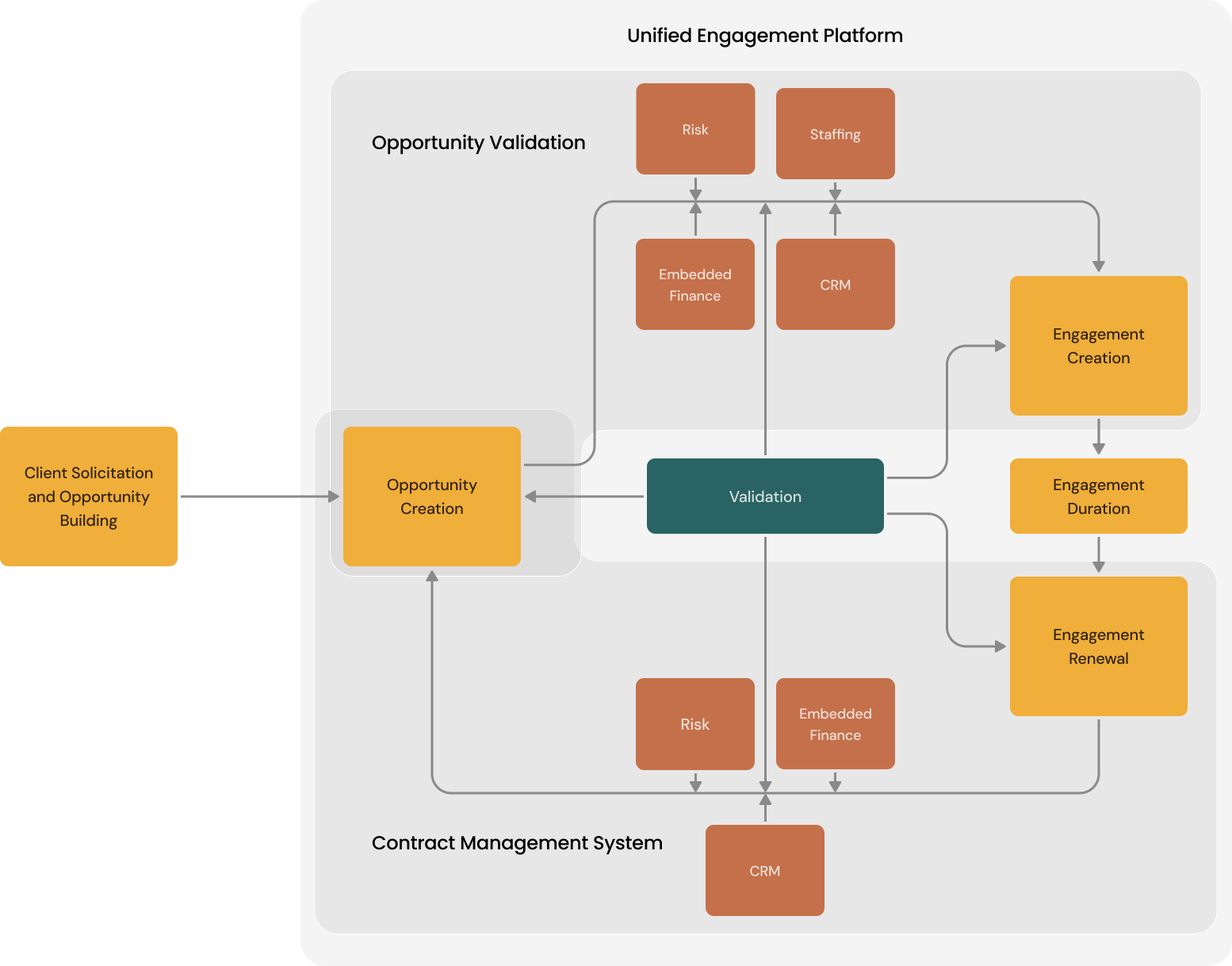
PwC's engagement management ecosystem turns client opportunities into billable engagements across every global territory. It handles risk assessment, financial analysis, compliance validation, and recurring contract management.
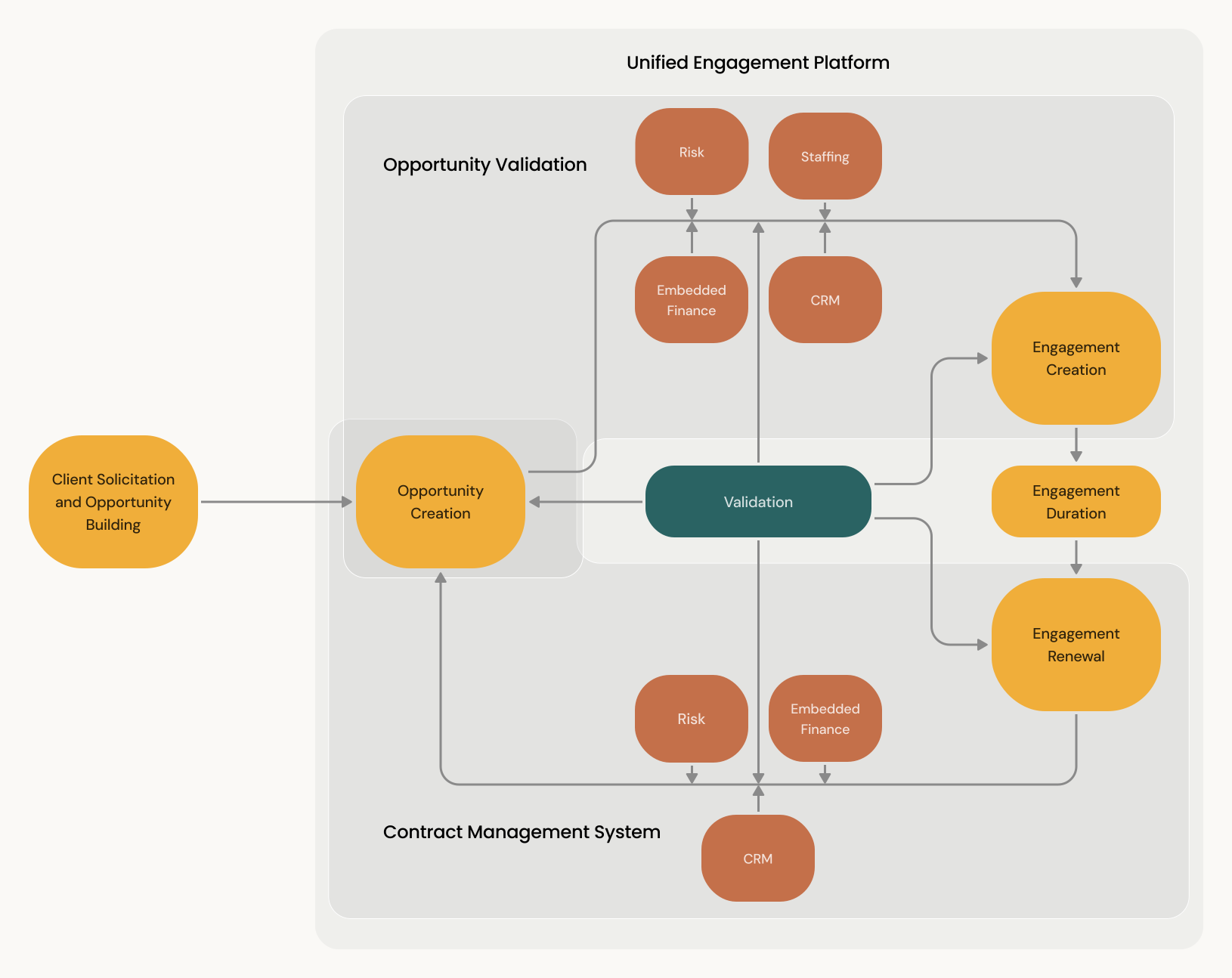
When I arrived, the system had two separate platforms, one for opportunity validation and one for engagement management. These two were supposed to work together but didn't communicate well. The business wanted them merged into a single unified platform.
Global Research
We were given a loose project scope and told to jump into rapid design development. My UX manager and I pushed back. Designing a global platform without understanding how different territories actually used it would create solutions that worked for no one.
We split our efforts. My UX manager led global research while I managed stakeholder expectations with design deliverables, buying us time. I was her right hand throughout. I attended every workshop with middle office teams from 12 global territories, reviewed Zoom recordings and Copilot transcripts, and synthesized insights through Condens.
What We Learned
01
Some Regions Had It Figured Out
Certain territories didn't want us touching the system. It worked well for them. The lesson: don't break what's working. Design for flexibility, not uniformity.
02
Local Laws Created Friction
Several territories struggled with recurring engagements because the system didn't account for local financial regulations. What worked in one region created compliance issues in another.
03
Others Built Workarounds
Some regions had homegrown solutions filling gaps the platform didn't address. We studied these workarounds to understand what was missing.
04
Shared Teams, Mixed Data
Some territories share operations teams across borders. Their engagements sometimes got mixed up because the system wasn't designed for cross-territory collaboration.
05
Fragmented Visibility Across Roles
Multiple teams within each territory worked on interconnected tasks but had no shared view of progress. This insight directly informed the dashboard concept later.
Not every territory could get custom features. But understanding regional differences helped us prioritize solutions that served the broadest set of users.
Information Architecture
The first decision was how to organize the platform's navigation. We debated a 2-tab structure that matched users' current mental model versus a 3-tab structure that would establish a new one.
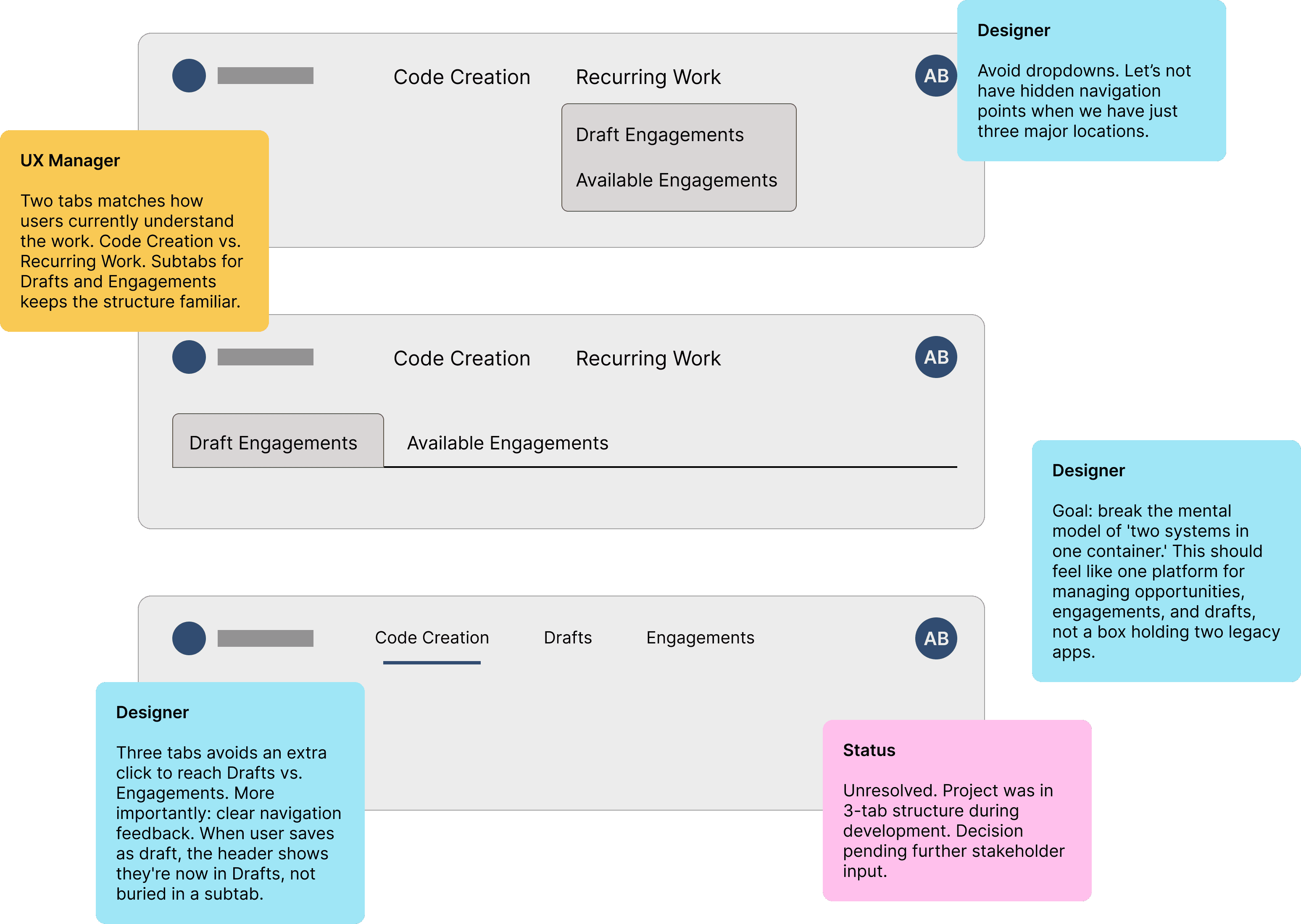
I advocated for three tabs. Users were moving between opportunity creation, draft management, and engagement lists constantly. Without a dashboard to surface everything, each workflow deserved top-level visibility. I also wanted clear navigation feedback. When a user saves a draft, the global header should reflect that they've moved into Drafts, not leave them guessing which subtab they're in. Above all, I wanted to break the mental model of "two systems in one container" and establish Easy Engage Plus as a unified platform.
The 3-tab structure was applied, though still in active debate with stakeholders when I left the project.
What I Designed
Engagement Lists
A filterable, sortable view of all engagements: ongoing, completed, drafts, and marked for recurrence. Users can select engagements and process them through recurrence workflows. The most important details are shown at a glance, with more accessible through expansion.
Draft engagements list with expanded details
Engagement Forms
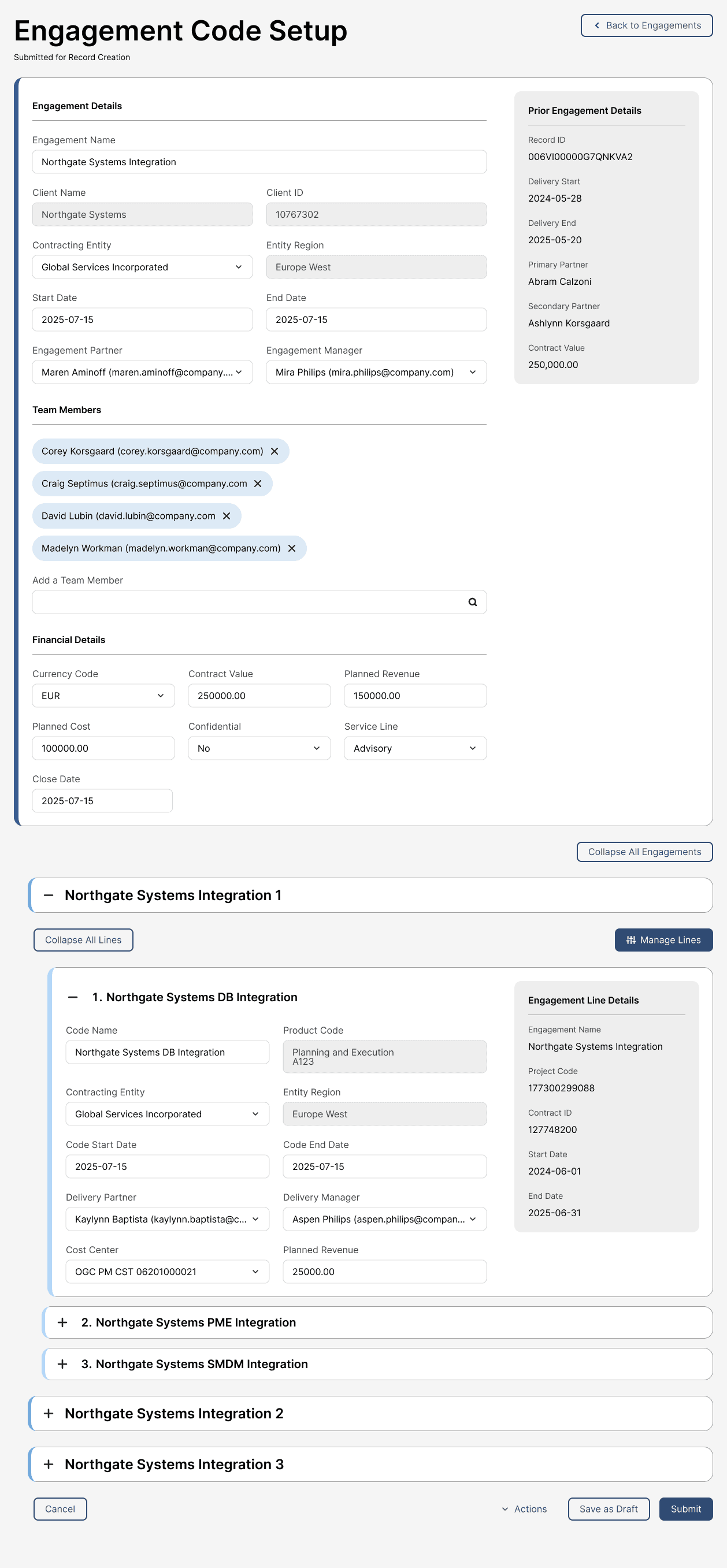
Extensive forms for editing engagement details, line information, and line management. These work both during active engagements and when preparing for recurrence.
Recurring engagement forms with multiple engagements and project lines
I redesigned the form hierarchy for users managing dozens of engagements per day under compliance pressure. The decisions:
Progressive indentation (24px per nesting level) so users can scan deep hierarchical structures without losing their place
Color-coded backgrounds (shades of blue) to differentiate engagement header, engagements, and project lines
A read-only sidebar showing prior engagement context for recurring engagements, preventing accidental edits to locked fields
Grouping inputs in the engagement header into sections (Prior Engagement Details, Engagement Details, Team Members, Financial Details) to make entries easier to follow
Before:
Same visual level for engagements and nested project lines. Not scannable. No separation between prior engagement context and current details. Fewer fields.
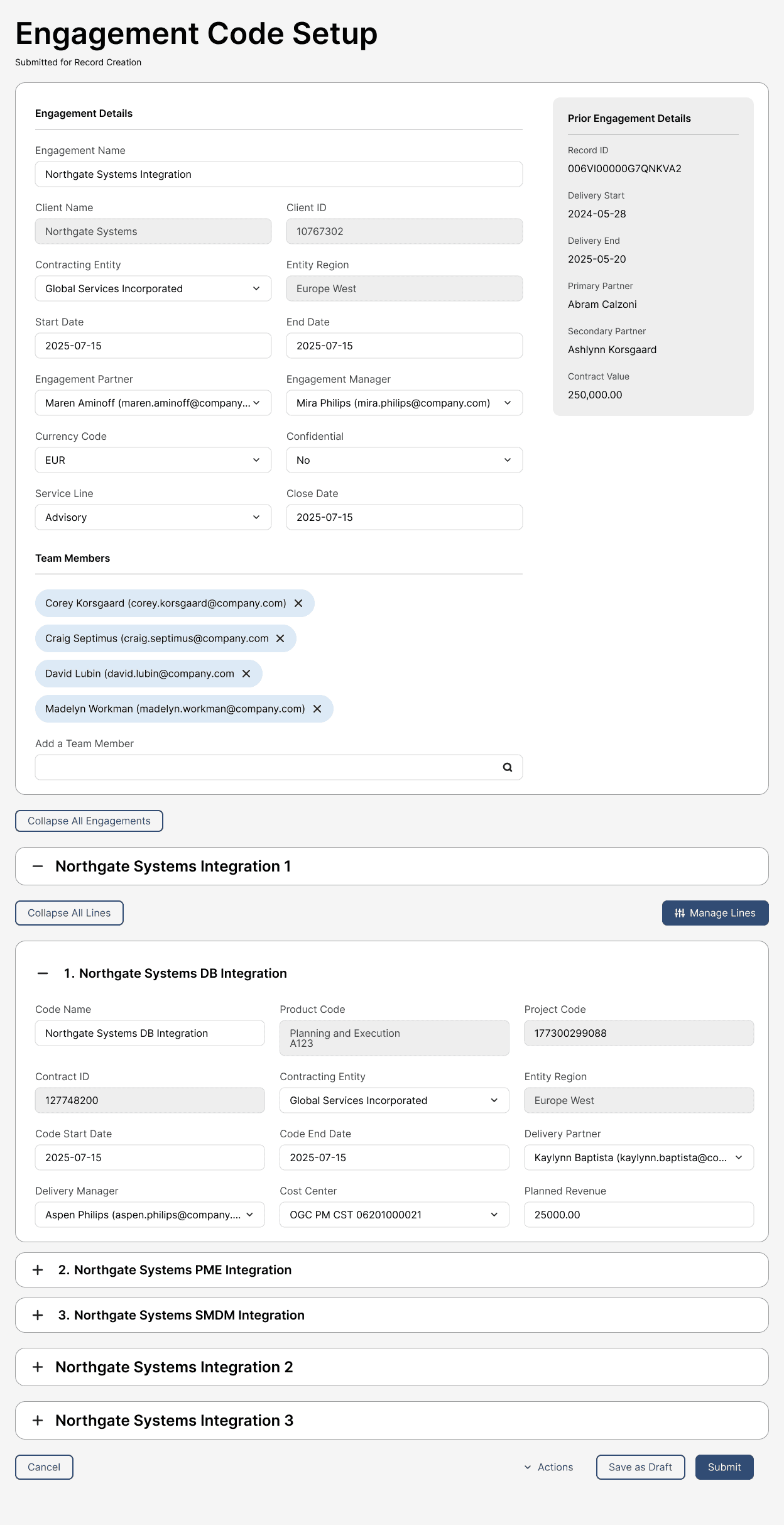
After:
Hierarchical indentation, color-differentiated levels, a Back to Engagements link, separated prior-engagement context, new fields, and grouped header sections.
Recurrence Flow
The complete process of turning a completed engagement back into a new opportunity for renewal during a new time period.
Initiating recurrence on an Engagement and saving to Drafts
Line Management
Each engagement has multiple product lines with their own managers, codes, and data. I designed the experience for linking, merging, adding, and removing lines when preparing engagements for recurrence.
Line operations were the most complex part of the system. I mapped these flows collaboratively to define edge cases and prevent errors at scale.
Key Decisions:
Two paths for merging (automatic search vs. manual evaluation) converge at a confirmation modal, preventing accidental bulk merges. The automatic merge was shelved for later development due to technical complexity, but we laid the groundwork.
Duplicate lines use templates from each engagement's existing lead lines. Users never start from blank.
Additive actions happen in a single click. Destructive actions like merging and deletion require modal confirmation.
Any action taken in Manage Lines mode can be reversed by canceling. Changes save only when the user submits or saves the engagement as a draft while in Edit mode. Communicated through modals and toast notifications.
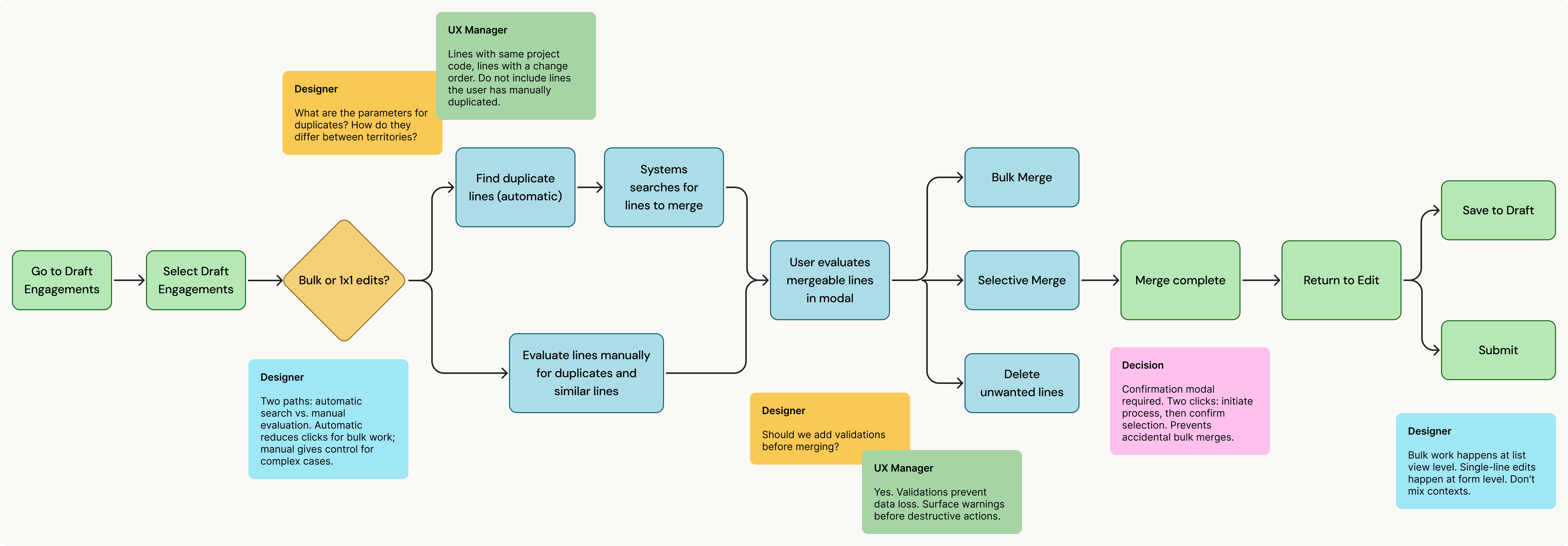
Merge Lines user flow
Line management on a recurring Engagement and field validations
I designed the line component in the Manage Mode to show default state, selected state, and lead line designation. Linked lines display visual indicators showing their relationship to the lead line.



Project Line components in Manage Mode of the Engagement Form
Validation System
When forms are submitted, they run through compliance checks before being submitted to risk analysis and finance teams. I designed the notification system for warnings (informational) versus hard stops (must fix before continuing).
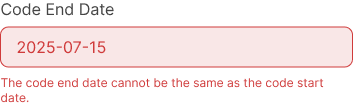
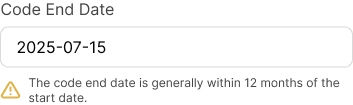
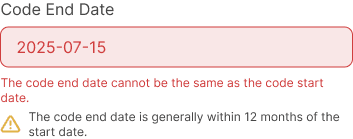
Validation states at the input field level
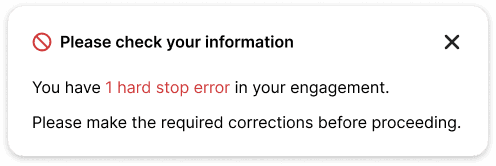
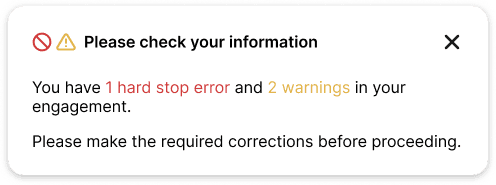
Toast notifications in case there are any validation hard stops
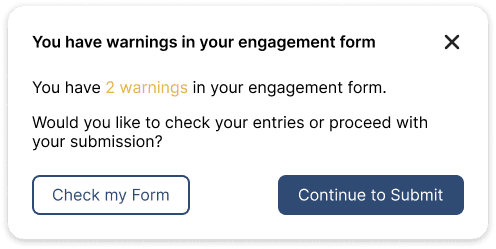
Modal verification in case of any warnings and no hard stops
Shelved for Later: Automated Rollovers
Based on research findings, we explored a feature for automated rollovers that would scan for eligible engagements and roll them forward without manual initiation. We mapped the flow and began groundwork but deprioritized it. Line management had to ship first, and the technical complexity of automation required more foundation.

During her time at PwC, Surya demonstrated resilience and adaptability through periods of constant change and consistently took ownership of her work with minimal oversight, making her a trusted UX partner. Throughout challenging timelines, she remained committed to advocating for strong UX practices and maintaining focus on delivering quality UI.
Jennifer Dolan
Sr UX Manager, PwC
Strategic Vision: Team-Configurable Dashboard
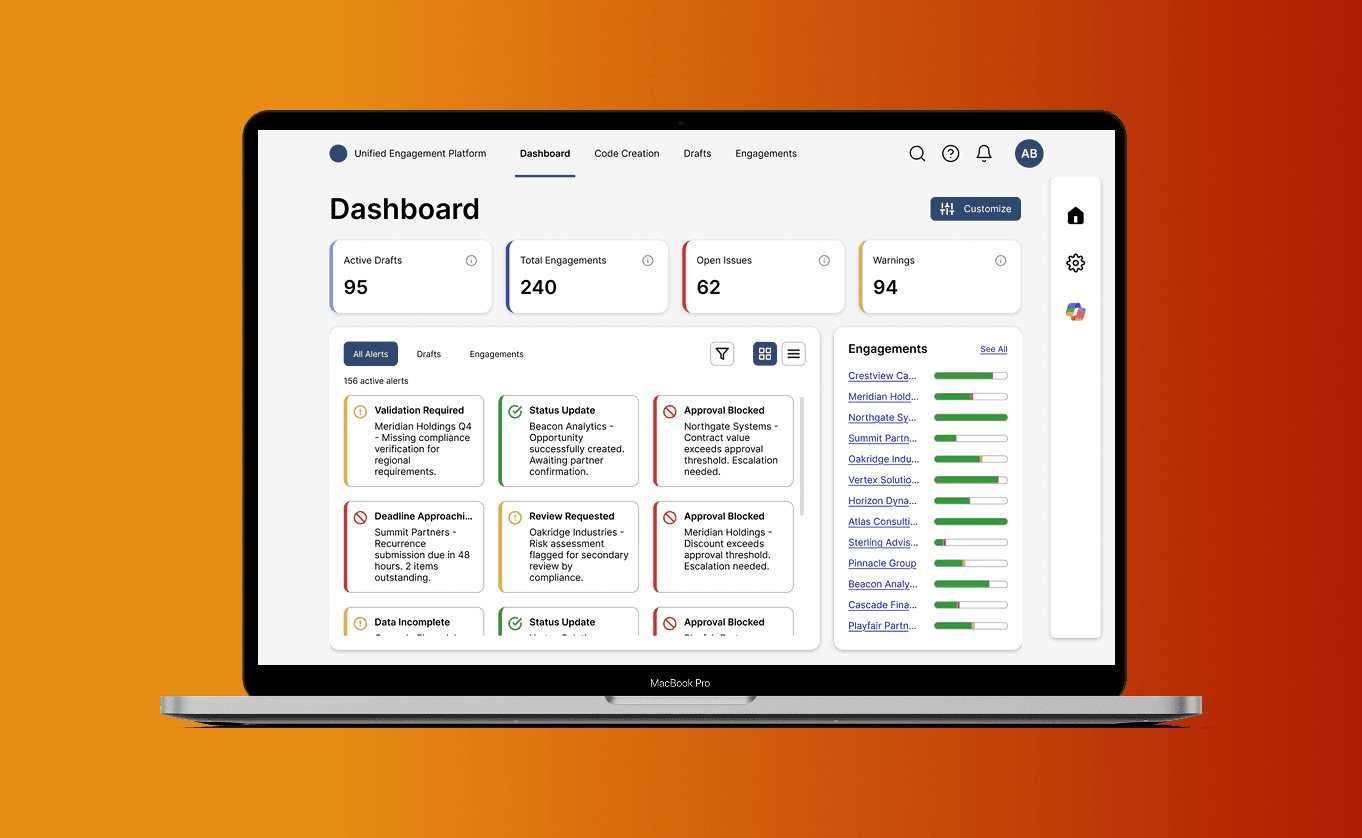
Through global research, I identified a gap: teams had no single place to understand operational status. Information existed (notifications showed alerts, Code Creation showed opportunities) but it was scattered. Managers spent their first hour each day checking three separate views just to see what needed attention.
I advocated for a dashboard concept that would give teams a unified operational view while respecting territorial differences.
The Design
The challenge was balancing standardization with flexibility. Every territory had different priorities and workflows. We couldn't customize the core recurrence process for everyone, but we could let teams configure how they viewed their work.
The solution had two capabilities:
Operational Overview: Summary metrics, alert feed, and engagement progress: a single source of truth for daily decisions
Customization Layer: Widget-based configuration letting teams surface what mattered most to their workflow
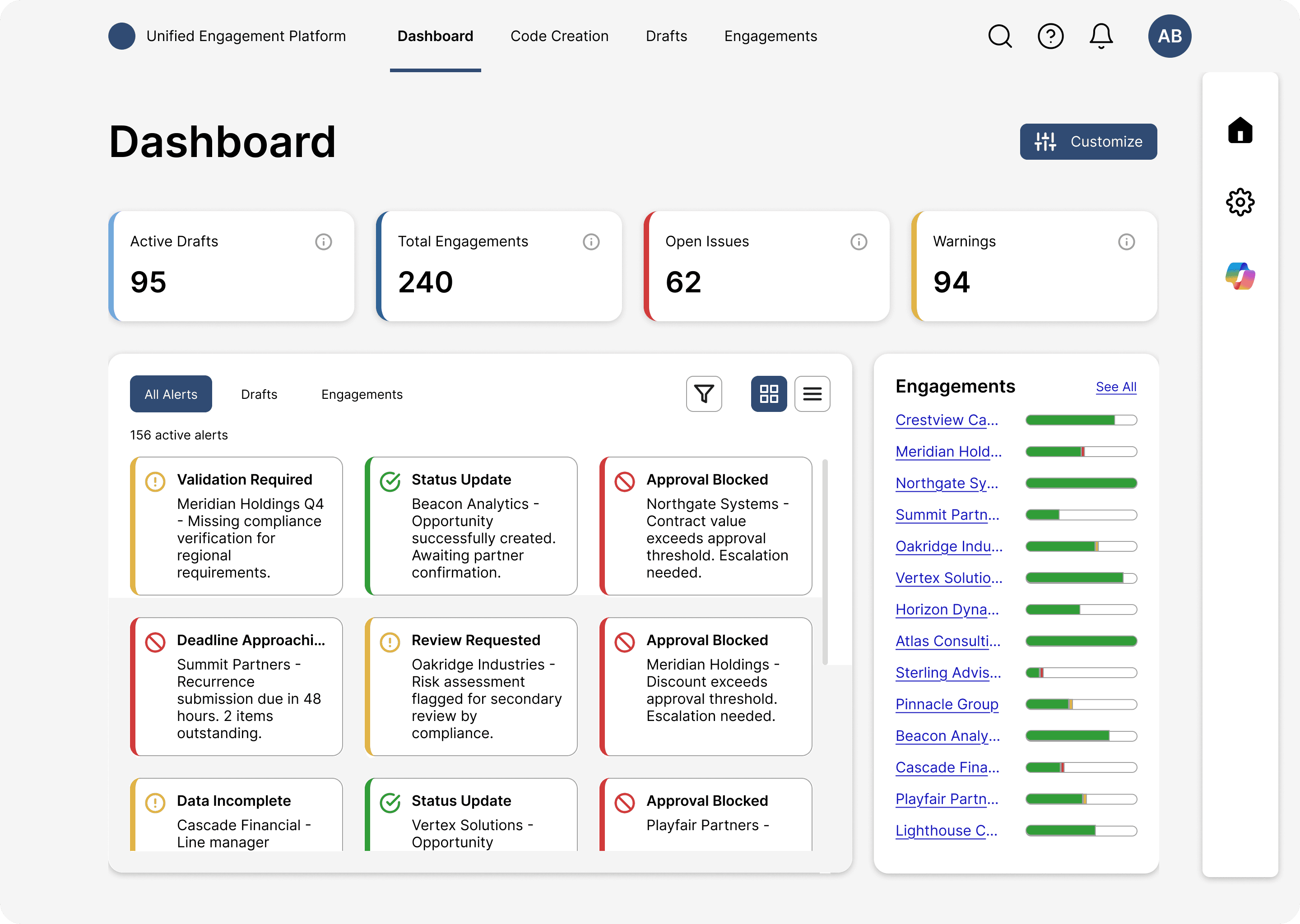
Proposed Dashboard Concept - Middle Office Analyst
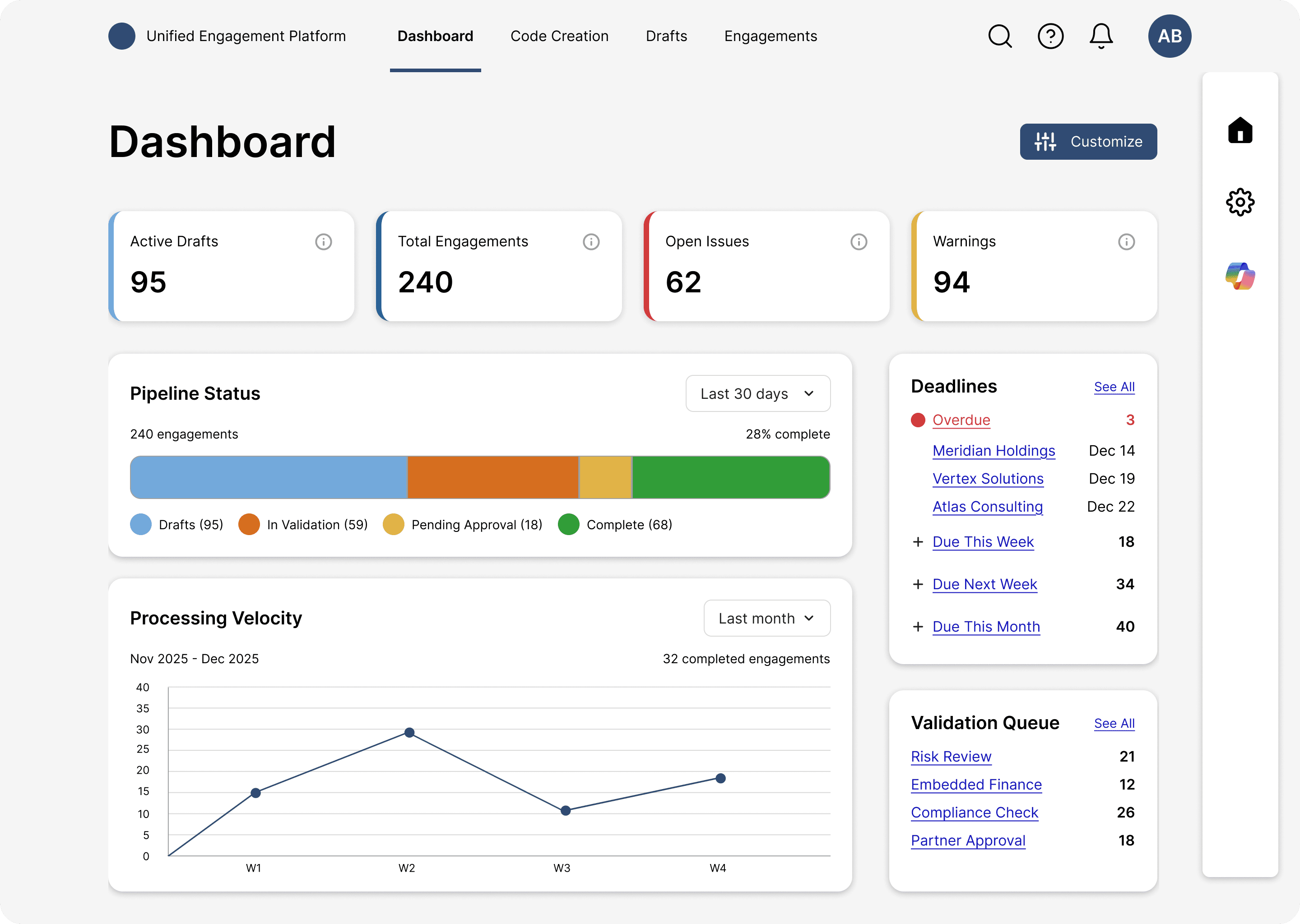
Proposed Dashboard Concept - Manager
What It Shaped
The dashboard itself wasn't built before my contract ended. But pitching it as a strategic north star shaped how we structured notifications, validation states, and progress tracking. Decisions made in those areas were informed by the vision of a future where teams could configure their operational view. The dashboard didn't ship as a feature. It shipped as the architecture underneath the platform.
Mentorship
I mentored a junior designer who had been working on the Contract Management Platform longer than me. He had worked with the team using Adobe XD and I helped him move to Figma, taught him how to make strategic design decisions, and handed off wireframing tasks to him as his judgment developed.
AI-Native Onboarding
Context
Consultants needed to access multiple systems, each with its own onboarding flow. Entry points were scattered and confusing. This project consolidated all of them into a single AI-driven interface, intended as a pattern for AI applications across PwC.
What I Designed
A single AI-driven interface for system access. The core design challenge was deciding when users should interact conversationally (typing, speaking) and when structured selection (dropdowns, forms) would serve them better.
The principle I established and advocated for:
Conversational when the user's intent is unclear or they need guidance discovering options.
Structured when the user knows what they want and speed matters more than exploration. Also when precision is critical (entity selection, dates, codes), because structured forms prevent AI misinterpretation.
The distinction is important because conversational interaction is the wrong default for tasks where users already know what they want. Forcing a chat interface on a precise task adds friction and creates room for misinterpretation. The case for responsible AI design is not whether to use AI, but where it actually serves the user.
AI-native onboarding experience
My contract ended before the final implementation shipped.
Validation Framework
Context
A new backend application for field and form-level validations across the entire engagement management ecosystem, covering all customer engagement and contract management applications.
What I Designed
Rule creation, verification, and management flows for two user types:
This was the project that brought me to Duane Gayle's attention and led to my inclusion in PwC's Lean UX Center of Excellence.
Impact
10% Faster Delivery
The new workflow caught issues during design, not during QA. Less rework meant faster sprints.
25% Better Consistency
Clear documentation and linked handoffs meant developers built what designers intended.
Companywide Adoption
After the pilot, I presented results at PwC's Lean UX Center of Excellence. Members adopted elements of the framework for their own teams. The process was applied to the main platform redesign and influenced teams I never worked with directly.
Beyond the metrics, the systemic change mattered more:
Developers had a voice at business-dominated tables.
Design decisions were informed by technical constraints from day one.
Documentation eliminated ambiguity and reduced blame cycles.
Teams collaborated instead of coordinating.
Reflections
01
Process Design Is Product Design
The most impactful work I did at PwC was designing how teams work together. Identifying inefficiencies in handoffs and creating structured collaboration rituals improved outcomes for every project that followed. The workflow outlasted any individual feature I designed.
02
Early Alignment Prevents Late Chaos
The Briefing and Feedback stages of my process exist because of this insight. Bringing developers into design conversations from the beginning, rather than treating them as implementation resources receiving PNG attachments, prevented weeks of rework. A 30-minute design review with engineering present caught issues that would have cost us days in QA and wasted sprint cycles.
03
Global Research Requires Strategic Synthesis
Working across 12 territories with different regulations, workflows, and needs taught me how to synthesize diverse requirements into scalable solutions. The goal wasn't making everyone happy. It was making decisions that served the broadest set of users while acknowledging tradeoffs.
04
Strategic Vision Shapes Work Even When It Doesn't Ship
The dashboard concept I proposed never got built as a feature. The advocacy for it shaped how notifications, validation, and progress tracking were structured. Strategic thinking does work in the architecture, not just in the artifacts.